It's that time again when my Mac is so full of storage, 20GB left and I have no clue why. I used to use GrandPerspective to hunt down and delete stuff I didn't need, but doing that every few months got boring and tedious. So I reset my Mac. Bit of a drastic measure, but it was needed.
I only use my Mac to code and browse the web, not much else, so what I do shouldn't take up a lot of storage, but it gradually builds up anyway.
A few useful tweaks I do when setting up a fresh Mac:
1. Install a package manager
Most useful thing ever. Before I reset, I always make a list of what I have installed with brew list, just to make it easier to reinstall the useful apps afterwards.
/bin/bash -c "$(curl -fsSL https://raw.githubusercontent.com/Homebrew/install/HEAD/install.sh)"
You should never trust a command from a place you don't know and trust. Go to brew.sh if you'd like to get the command directly from them.
2. Add a divider to the Dock
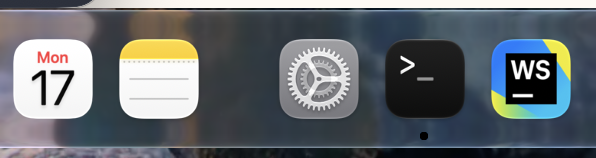
Large spacer:
defaults write com.apple.dock persistent-apps -array-add '{"tile-type"="spacer-tile";}'
Small spacer:
defaults write com.apple.dock persistent-apps -array-add '{"tile-type"="small-spacer-tile";}'
Then restart the Dock to see the change:
killall Dock
3. Install Thaw
I also installed Thaw to the menu bar, it lets me hide apps from it to keep things clean.
brew install thaw


Fresh install, way less clutter, and this time I've actually got a list of what to reinstall next time it fills up again.